<?xml version="1.0" encoding="utf-8"?>
<feed xmlns="http://www.w3.org/2005/Atom">
	<title type="html"><![CDATA[Slideshow Forum : How to Make a Slideshow : Tutorials, Tips, Samples — New slide effects: falling leaves, snow, bubbles, butterflies, etc.]]></title>
	<link rel="self" href="http://slideshow-forum.com/extern.php?action=feed&amp;tid=55&amp;type=atom" />
	<updated>2016-04-02T22:43:04Z</updated>
	<generator>PunBB</generator>
	<id>http://slideshow-forum.com/viewtopic.php?id=55</id>
		<entry>
			<title type="html"><![CDATA[Re: New slide effects: falling leaves, snow, bubbles, butterflies, etc.]]></title>
			<link rel="alternate" href="http://slideshow-forum.com/viewtopic.php?pid=815#p815" />
			<content type="html"><![CDATA[<p>OK thanks Lesley</p>]]></content>
			<author>
				<name><![CDATA[JeffK]]></name>
				<uri>http://slideshow-forum.com/profile.php?id=306</uri>
			</author>
			<updated>2016-04-02T22:43:04Z</updated>
			<id>http://slideshow-forum.com/viewtopic.php?pid=815#p815</id>
		</entry>
		<entry>
			<title type="html"><![CDATA[Re: New slide effects: falling leaves, snow, bubbles, butterflies, etc.]]></title>
			<link rel="alternate" href="http://slideshow-forum.com/viewtopic.php?pid=801#p801" />
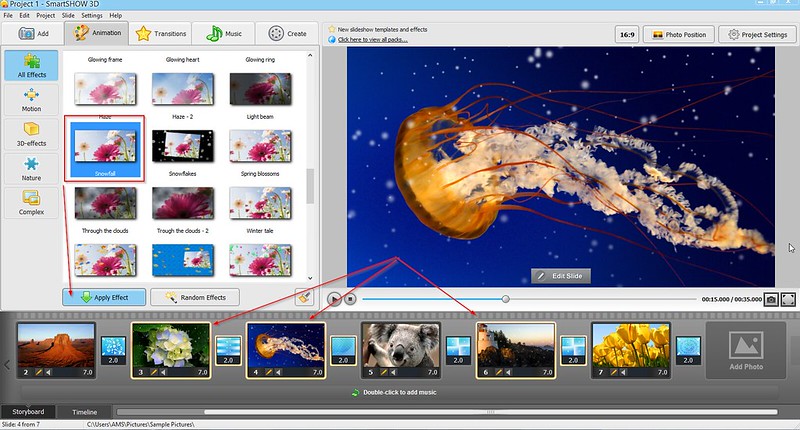
			<content type="html"><![CDATA[<p>Not from the slide editor.<br />However, some nature effects can also be found in the Animation tab (&quot;Autumn Mood&quot; and &quot;Snowfall&quot; for example) and you can add these to a group of slides at a time.</p><p>Here are the steps.<br />1. Open the Animation tab and find the effects you want (probably in the Nature group). I chose &quot;Snowfall&quot; to make a sample screenshot for you.<br />2. Select a group of slides in the storyboard holding the <strong>Ctrl</strong> key. I selected slides 3, 4, and 6.<br />3. Click <strong>Apply Effect</strong>. </p><p>And here&#039;s a screenshot:<br /><a href="https://flic.kr/p/FSh9EX"><span class="postimg"><img src="https://farm2.staticflickr.com/1452/26166889715_9180a31c06_c.jpg" alt="https://farm2.staticflickr.com/1452/26166889715_9180a31c06_c.jpg" /></span></a></p>]]></content>
			<author>
				<name><![CDATA[Lesley]]></name>
				<uri>http://slideshow-forum.com/profile.php?id=3</uri>
			</author>
			<updated>2016-04-01T09:34:23Z</updated>
			<id>http://slideshow-forum.com/viewtopic.php?pid=801#p801</id>
		</entry>
		<entry>
			<title type="html"><![CDATA[Re: New slide effects: falling leaves, snow, bubbles, butterflies, etc.]]></title>
			<link rel="alternate" href="http://slideshow-forum.com/viewtopic.php?pid=800#p800" />
			<content type="html"><![CDATA[<p>May I resurrect this thread to ask if slide effects can be added to more than one image at a time?</p>]]></content>
			<author>
				<name><![CDATA[JeffK]]></name>
				<uri>http://slideshow-forum.com/profile.php?id=306</uri>
			</author>
			<updated>2016-04-01T02:05:43Z</updated>
			<id>http://slideshow-forum.com/viewtopic.php?pid=800#p800</id>
		</entry>
		<entry>
			<title type="html"><![CDATA[Re: New slide effects: falling leaves, snow, bubbles, butterflies, etc.]]></title>
			<link rel="alternate" href="http://slideshow-forum.com/viewtopic.php?pid=611#p611" />
			<content type="html"><![CDATA[<p>Too bad, I just have to choose another effect then. <br />Anyway, thanks for you reply. Hope to see more functions in your app soon.</p>]]></content>
			<author>
				<name><![CDATA[Thomas]]></name>
				<uri>http://slideshow-forum.com/profile.php?id=144</uri>
			</author>
			<updated>2015-07-28T13:18:57Z</updated>
			<id>http://slideshow-forum.com/viewtopic.php?pid=611#p611</id>
		</entry>
		<entry>
			<title type="html"><![CDATA[Re: New slide effects: falling leaves, snow, bubbles, butterflies, etc.]]></title>
			<link rel="alternate" href="http://slideshow-forum.com/viewtopic.php?pid=602#p602" />
			<content type="html"><![CDATA[<p>All the &quot;nature&quot; effects are applied to the whole slide, and they serve as an additional layer which is immune to resizing. Unfortunately, your idea can&#039;t be realized in the current version of SmartSHOW 3D. Anyway, there are still plenty of opportunities to jazz up your slideshow with awesome effects.</p>]]></content>
			<author>
				<name><![CDATA[Robin]]></name>
				<uri>http://slideshow-forum.com/profile.php?id=143</uri>
			</author>
			<updated>2015-07-21T14:29:07Z</updated>
			<id>http://slideshow-forum.com/viewtopic.php?pid=602#p602</id>
		</entry>
		<entry>
			<title type="html"><![CDATA[Re: New slide effects: falling leaves, snow, bubbles, butterflies, etc.]]></title>
			<link rel="alternate" href="http://slideshow-forum.com/viewtopic.php?pid=599#p599" />
			<content type="html"><![CDATA[<p>I was trying to add &quot;clouds&quot; effect to my photo and couldn&#039;t find the way to change the area to apply it for. The thing is, I have a photo where the sky takes like the half and I want clouds to be running in the upper half of the photo. Is it manageable?</p>]]></content>
			<author>
				<name><![CDATA[Thomas]]></name>
				<uri>http://slideshow-forum.com/profile.php?id=144</uri>
			</author>
			<updated>2015-07-15T09:50:30Z</updated>
			<id>http://slideshow-forum.com/viewtopic.php?pid=599#p599</id>
		</entry>
		<entry>
			<title type="html"><![CDATA[Re: New slide effects: falling leaves, snow, bubbles, butterflies, etc.]]></title>
			<link rel="alternate" href="http://slideshow-forum.com/viewtopic.php?pid=270#p270" />
			<content type="html"><![CDATA[<p>Here&#039;s a screenshot showing where to find the Rain effect:</p><p><span class="postimg"><img src="http://smartshow-software.com/images/rain.jpg" alt="rain-effect" /></span></p><br /><p>And here is a nice example of the rain effect, used by the designer for the &quot;Four Seasons&quot; templates collection:<br /><a href="http://youtu.be/KCBd58ytDEs?t=1m32s">watch in action!</a></p>]]></content>
			<author>
				<name><![CDATA[Lesley]]></name>
				<uri>http://slideshow-forum.com/profile.php?id=3</uri>
			</author>
			<updated>2014-07-01T16:37:31Z</updated>
			<id>http://slideshow-forum.com/viewtopic.php?pid=270#p270</id>
		</entry>
		<entry>
			<title type="html"><![CDATA[Re: New slide effects: falling leaves, snow, bubbles, butterflies, etc.]]></title>
			<link rel="alternate" href="http://slideshow-forum.com/viewtopic.php?pid=269#p269" />
			<content type="html"><![CDATA[<p>I must be suffering a senior moment, because I cannot find any rain effects?&nbsp; Where exactly would I find them please?</p><p>Never mind, I have found them, and the effect is really good after a bit of tweaking!</p>]]></content>
			<author>
				<name><![CDATA[Willabong]]></name>
				<uri>http://slideshow-forum.com/profile.php?id=36</uri>
			</author>
			<updated>2014-07-01T12:41:24Z</updated>
			<id>http://slideshow-forum.com/viewtopic.php?pid=269#p269</id>
		</entry>
		<entry>
			<title type="html"><![CDATA[Re: New slide effects: falling leaves, snow, bubbles, butterflies, etc.]]></title>
			<link rel="alternate" href="http://slideshow-forum.com/viewtopic.php?pid=265#p265" />
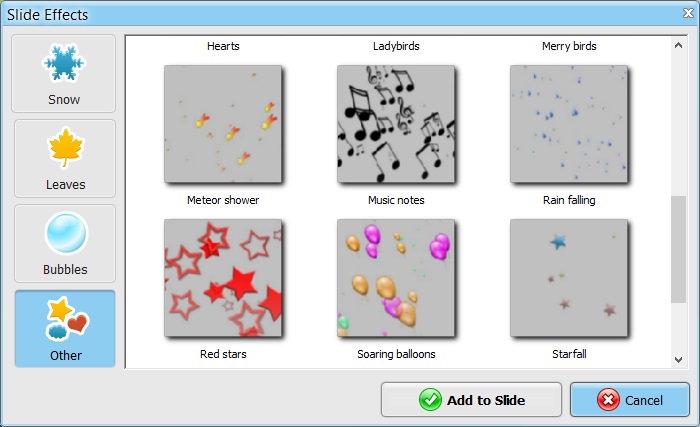
			<content type="html"><![CDATA[<p>Check out the Rain effect in the Other section.<br />There are several presets: Autumn rain, Large drops, Rain shower, Rain through sunshine.<br />You can also play with the effect settings - number and size of rain drops, speed, direction etc. - this way you can create an original effect of your own.</p>]]></content>
			<author>
				<name><![CDATA[Lesley]]></name>
				<uri>http://slideshow-forum.com/profile.php?id=3</uri>
			</author>
			<updated>2014-06-30T05:36:19Z</updated>
			<id>http://slideshow-forum.com/viewtopic.php?pid=265#p265</id>
		</entry>
		<entry>
			<title type="html"><![CDATA[Re: New slide effects: falling leaves, snow, bubbles, butterflies, etc.]]></title>
			<link rel="alternate" href="http://slideshow-forum.com/viewtopic.php?pid=264#p264" />
			<content type="html"><![CDATA[<p>Could a future version add some rain effects, from gentle showers to heavy stormy rain?</p>]]></content>
			<author>
				<name><![CDATA[Willabong]]></name>
				<uri>http://slideshow-forum.com/profile.php?id=36</uri>
			</author>
			<updated>2014-06-29T15:36:40Z</updated>
			<id>http://slideshow-forum.com/viewtopic.php?pid=264#p264</id>
		</entry>
		<entry>
			<title type="html"><![CDATA[Re: New slide effects: falling leaves, snow, bubbles, butterflies, etc.]]></title>
			<link rel="alternate" href="http://slideshow-forum.com/viewtopic.php?pid=252#p252" />
			<content type="html"><![CDATA[<p>You cannot mix the type of effects shown here (would look pretty weird in fact!), but you can certainly combine these effects with standard layers animation and camera animation.<br />Besides, there is a separate set of Glow effects, and there are no limits for mixing them. We&#039;ll make a demo on glow effects soon.</p>]]></content>
			<author>
				<name><![CDATA[Lesley]]></name>
				<uri>http://slideshow-forum.com/profile.php?id=3</uri>
			</author>
			<updated>2014-06-09T13:21:29Z</updated>
			<id>http://slideshow-forum.com/viewtopic.php?pid=252#p252</id>
		</entry>
		<entry>
			<title type="html"><![CDATA[Re: New slide effects: falling leaves, snow, bubbles, butterflies, etc.]]></title>
			<link rel="alternate" href="http://slideshow-forum.com/viewtopic.php?pid=251#p251" />
			<content type="html"><![CDATA[<p>That&#039;s a huge pack, I like it. And a quick question - can you mix different types of motion effects? Like putting butterflies and bubbles together etc.?</p>]]></content>
			<author>
				<name><![CDATA[surfinbird]]></name>
				<uri>http://slideshow-forum.com/profile.php?id=18</uri>
			</author>
			<updated>2014-06-09T10:33:43Z</updated>
			<id>http://slideshow-forum.com/viewtopic.php?pid=251#p251</id>
		</entry>
		<entry>
			<title type="html"><![CDATA[New slide effects: falling leaves, snow, bubbles, butterflies, etc.]]></title>
			<link rel="alternate" href="http://slideshow-forum.com/viewtopic.php?pid=250#p250" />
			<content type="html"><![CDATA[<p>SmartSHOW 3D 4.0 features a great variety of beautiful slide effects which are based on 3D particles motion.</p><p>Now you can add falling leaves or snowstorm to your photos, make butterflies flatter, bubbles fly around, and a lot more. The slide editor lets you fine-tune the effect settings: make snowflakes spin and fall slowly, choose the image, size and number of the leaves, etc. There are endless opportunities for creativity here!</p><p>This video lesson reveals some secrets of slide effects:</p><p><div class="fancy_video_tag_player"><iframe class="youtube-player" type="text/html" width="640" height="385" src="http://www.youtube.com/embed/Jabjs63zia0" frameborder="0"></iframe></div></p>]]></content>
			<author>
				<name><![CDATA[Lesley]]></name>
				<uri>http://slideshow-forum.com/profile.php?id=3</uri>
			</author>
			<updated>2014-06-09T09:12:02Z</updated>
			<id>http://slideshow-forum.com/viewtopic.php?pid=250#p250</id>
		</entry>
</feed>