<?xml version="1.0" encoding="utf-8"?>
<feed xmlns="http://www.w3.org/2005/Atom">
	<title type="html"><![CDATA[Slideshow Forum : How to Make a Slideshow : Tutorials, Tips, Samples — Apple m4v video files [Resolved]]]></title>
	<link rel="self" href="http://slideshow-forum.com/extern.php?action=feed&amp;tid=272&amp;type=atom" />
	<updated>2016-11-21T08:23:17Z</updated>
	<generator>PunBB</generator>
	<id>http://slideshow-forum.com/viewtopic.php?id=272</id>
		<entry>
			<title type="html"><![CDATA[Re: Apple m4v video files [Resolved]]]></title>
			<link rel="alternate" href="http://slideshow-forum.com/viewtopic.php?pid=1007#p1007" />
			<content type="html"><![CDATA[<p>Try this one: <a href="http://hamstersoft.com/free-video-converter/">http://hamstersoft.com/free-video-converter/</a> - it&#039;s a free program that converts the majority of common video formats.</p>]]></content>
			<author>
				<name><![CDATA[Lesley]]></name>
				<uri>http://slideshow-forum.com/profile.php?id=3</uri>
			</author>
			<updated>2016-11-21T08:23:17Z</updated>
			<id>http://slideshow-forum.com/viewtopic.php?pid=1007#p1007</id>
		</entry>
		<entry>
			<title type="html"><![CDATA[Re: Apple m4v video files [Resolved]]]></title>
			<link rel="alternate" href="http://slideshow-forum.com/viewtopic.php?pid=1004#p1004" />
			<content type="html"><![CDATA[<p>Thanks so much. Muting the sound worked.&nbsp; Now I&#039;ll look aroudn for a program to convert m4v to mp4</p>]]></content>
			<author>
				<name><![CDATA[rfrobi49]]></name>
				<uri>http://slideshow-forum.com/profile.php?id=436</uri>
			</author>
			<updated>2016-11-18T15:57:21Z</updated>
			<id>http://slideshow-forum.com/viewtopic.php?pid=1004#p1004</id>
		</entry>
		<entry>
			<title type="html"><![CDATA[Re: Apple m4v video files [Resolved]]]></title>
			<link rel="alternate" href="http://slideshow-forum.com/viewtopic.php?pid=1003#p1003" />
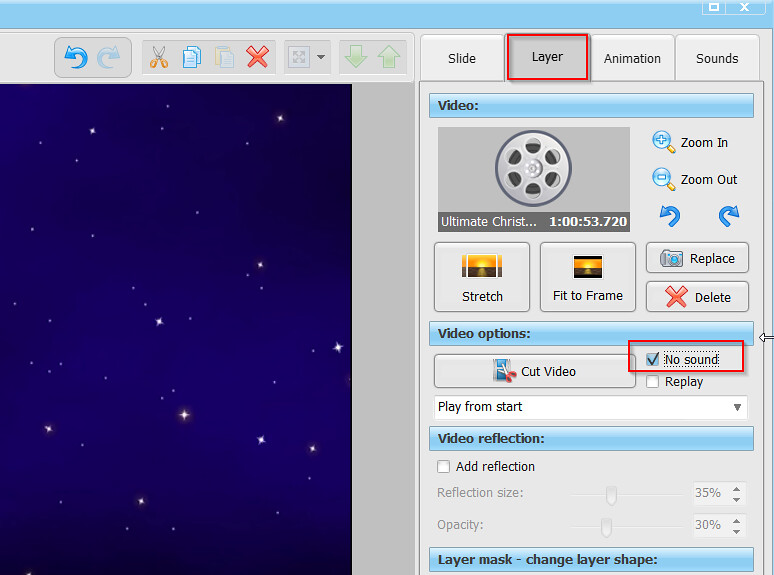
			<content type="html"><![CDATA[<p>Hi, you&#039;d better convert the M4V file first - it is not officially supported.<br />To mute the sound in the video, open the video layer settings and check &quot;No sound&quot; - see screenshot:</p><p><a href="https://flic.kr/p/P8T2S9"><span class="postimg"><img src="https://c1.staticflickr.com/6/5498/30937940552_b7ffc2c6fd_b.jpg" alt="https://c1.staticflickr.com/6/5498/30937940552_b7ffc2c6fd_b.jpg" /></span></a></p>]]></content>
			<author>
				<name><![CDATA[Lesley]]></name>
				<uri>http://slideshow-forum.com/profile.php?id=3</uri>
			</author>
			<updated>2016-11-18T09:06:46Z</updated>
			<id>http://slideshow-forum.com/viewtopic.php?pid=1003#p1003</id>
		</entry>
		<entry>
			<title type="html"><![CDATA[Apple m4v video files [Resolved]]]></title>
			<link rel="alternate" href="http://slideshow-forum.com/viewtopic.php?pid=1002#p1002" />
			<content type="html"><![CDATA[<p>I am doing a slideshow for some friends and one has given me a video made with an I-phone in M4V format. Can I add that to a project directly or do I need to do some sort fo &quot;conversion&quot; to mp4 format? </p><p>And, once a video is added to a project, how do I mute the sound that was originally recorded with a camera?</p><p>Thank you in advance,</p>]]></content>
			<author>
				<name><![CDATA[rfrobi49]]></name>
				<uri>http://slideshow-forum.com/profile.php?id=436</uri>
			</author>
			<updated>2016-11-17T16:15:36Z</updated>
			<id>http://slideshow-forum.com/viewtopic.php?pid=1002#p1002</id>
		</entry>
</feed>