<?xml version="1.0" encoding="utf-8"?>
<feed xmlns="http://www.w3.org/2005/Atom">
	<title type="html"><![CDATA[Slideshow Forum : How to Make a Slideshow : Tutorials, Tips, Samples — Changing Photos Aspect]]></title>
	<link rel="self" href="http://slideshow-forum.com/extern.php?action=feed&amp;tid=269&amp;type=atom" />
	<updated>2016-11-11T09:02:48Z</updated>
	<generator>PunBB</generator>
	<id>http://slideshow-forum.com/viewtopic.php?id=269</id>
		<entry>
			<title type="html"><![CDATA[Re: Changing Photos Aspect]]></title>
			<link rel="alternate" href="http://slideshow-forum.com/viewtopic.php?pid=998#p998" />
			<content type="html"><![CDATA[<p>I understand that the vertical pictures won&#039;t fit. I thought that you could probably take some new pictures, horizontal ones this time (like this one for example: <a href="http://ww4.hdnux.com/photos/34/03/12/7352995/3/1024x1024.jpg)">link</a>. Do you think that would work?</p><p>All of our templates are created for standard 4:3 photos from digital cameras, and most really have landscape-oriented boxes as people tend to hold the camera the usual way. But it&#039;s clear that there can be some exceptions, we have some templates with vertical boxes as well, not a whole set though.</p>]]></content>
			<author>
				<name><![CDATA[Lesley]]></name>
				<uri>http://slideshow-forum.com/profile.php?id=3</uri>
			</author>
			<updated>2016-11-11T09:02:48Z</updated>
			<id>http://slideshow-forum.com/viewtopic.php?pid=998#p998</id>
		</entry>
		<entry>
			<title type="html"><![CDATA[Re: Changing Photos Aspect]]></title>
			<link rel="alternate" href="http://slideshow-forum.com/viewtopic.php?pid=995#p995" />
			<content type="html"><![CDATA[<p>They are long necklaces. I already tried and the whole picture of the necklace won&#039;t fit. Wow wish I would have know this before I bought it. They need to make a version for both aspects. All your templates are like that.</p>]]></content>
			<author>
				<name><![CDATA[redhotrn65]]></name>
				<uri>http://slideshow-forum.com/profile.php?id=426</uri>
			</author>
			<updated>2016-11-10T19:35:39Z</updated>
			<id>http://slideshow-forum.com/viewtopic.php?pid=995#p995</id>
		</entry>
		<entry>
			<title type="html"><![CDATA[Re: Changing Photos Aspect]]></title>
			<link rel="alternate" href="http://slideshow-forum.com/viewtopic.php?pid=994#p994" />
			<content type="html"><![CDATA[<p>I&#039;m afraid there is no video lesson as this is quite an unusual task. I&#039;d say it would be easier for you to take new photos (landscape-oriented ones) than mess with complicated settings - you&#039;d really spend hours on modifying each template I suppose.<br />We could give you the steps for some layer of the first template to show you an example. However, if dealing with layers is not something you&#039;re already familiar with, you risk making lots of mistakes that will be hard to fix.<br />Do you think you could take new photos of your necklaces? That would be much faster and easier, believe me.</p>]]></content>
			<author>
				<name><![CDATA[Lesley]]></name>
				<uri>http://slideshow-forum.com/profile.php?id=3</uri>
			</author>
			<updated>2016-11-10T11:22:59Z</updated>
			<id>http://slideshow-forum.com/viewtopic.php?pid=994#p994</id>
		</entry>
		<entry>
			<title type="html"><![CDATA[Re: Changing Photos Aspect]]></title>
			<link rel="alternate" href="http://slideshow-forum.com/viewtopic.php?pid=993#p993" />
			<content type="html"><![CDATA[<p>It makes sense but is there a video that shows how to do this? This is for my business and unfortunately all my pics are in vertical aspect and can&#039;t be changed. It long necklaces. Maybe I could change it all, save it then just change the pics out as needed. I tried to do what you suggested but can&#039;t get it to work.&nbsp; I love this pack but won&#039;t be able to use it if I can&#039;t change the position. I would like to buy more templates but if I can&#039;t fix this one they won&#039;t do me any good since most are in horizontal aspect. Thanks!!!!</p>]]></content>
			<author>
				<name><![CDATA[redhotrn65]]></name>
				<uri>http://slideshow-forum.com/profile.php?id=426</uri>
			</author>
			<updated>2016-11-09T19:09:08Z</updated>
			<id>http://slideshow-forum.com/viewtopic.php?pid=993#p993</id>
		</entry>
		<entry>
			<title type="html"><![CDATA[Re: Changing Photos Aspect]]></title>
			<link rel="alternate" href="http://slideshow-forum.com/viewtopic.php?pid=991#p991" />
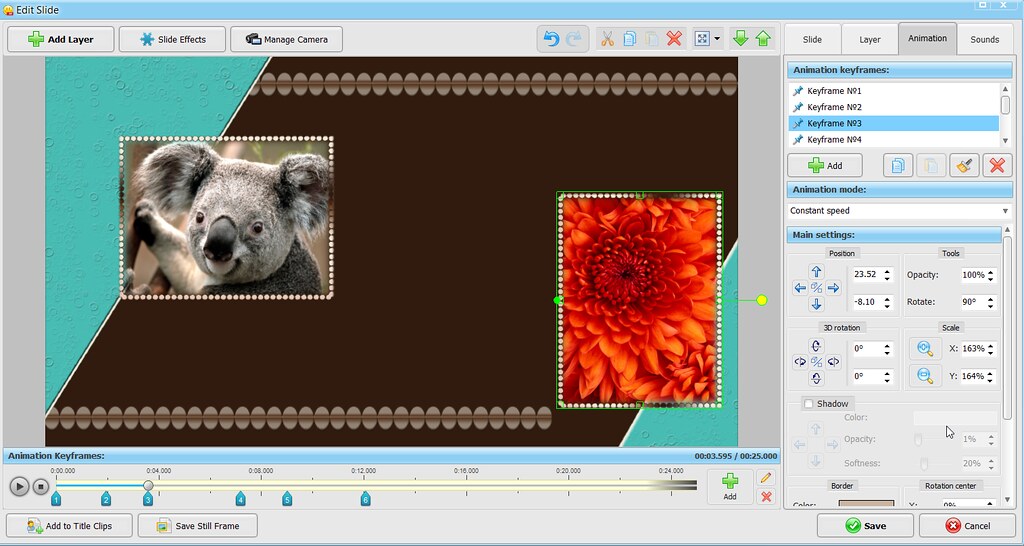
			<content type="html"><![CDATA[<p>That&#039;s possible in theory, but that&#039;s not easy at all because you&#039;d have to change too many settings.</p><p>Most of the slides have several photo boxes, and a frame for each photo. First, you&#039;ll need to find the corresponding frame layer for each photo. Then, change the Rotate setting in the Animation tab to 90 degrees - but not just once. You have to do the same for each of the keyframes, both for the frame layer and for the photo layer. As a result, the layer position will change and you&#039;ll probably want to adjust it - for each of the keyframes again. I tried rotating one of the frames (the layer name is 3.png in template 1), here&#039;s what it looks like:</p><p><a href="https://flic.kr/p/NzJLzm"><span class="postimg"><img src="https://c7.staticflickr.com/6/5822/30574200350_e408221e09_b.jpg" alt="https://c7.staticflickr.com/6/5822/30574200350_e408221e09_b.jpg" /></span></a></p><p>As you see, the one on the right is vertical, but it&#039;s off center now. You can change the position for each of the keyframes, though. Cumbersome but possible.</p><p>You can&#039;t simply change the frame shape because each frame is a png file with its own dimensions and a certain aspect ratio.</p><p>Hope this makes some sense.</p>]]></content>
			<author>
				<name><![CDATA[Lesley]]></name>
				<uri>http://slideshow-forum.com/profile.php?id=3</uri>
			</author>
			<updated>2016-11-09T09:54:46Z</updated>
			<id>http://slideshow-forum.com/viewtopic.php?pid=991#p991</id>
		</entry>
		<entry>
			<title type="html"><![CDATA[Changing Photos Aspect]]></title>
			<link rel="alternate" href="http://slideshow-forum.com/viewtopic.php?pid=990#p990" />
			<content type="html"><![CDATA[<p>I purchased the glamourous style template pack and am needing to change the photo aspect from horizontal to vertical and can&#039;t seem to get the animated frames around the pic to change to a vertical view. Is there a way to do that?</p>]]></content>
			<author>
				<name><![CDATA[redhotrn65]]></name>
				<uri>http://slideshow-forum.com/profile.php?id=426</uri>
			</author>
			<updated>2016-11-08T20:53:03Z</updated>
			<id>http://slideshow-forum.com/viewtopic.php?pid=990#p990</id>
		</entry>
</feed>